Following the release a a couple weeks ago at GitHub Universe 2025 I decided it was finally time to get my hands dirty with Copilot again. While I haven't written publicly about this yet, I've primarily been using Cursor & Claude Code, which I've found to give me a great balance between in-IDE experience and raw LLM power.
Agents HQ is a step towards a simpler workflow that I've long been looking for. While I'm not a vibe coder by trade, my experience using LLM's on simpler projects and smaller tasks has generally been positive: it's saving me time and manual effort that I can use elsewhere in my life.
So coming back from what I see as the current "LLM dream team", how does this stack up to my existing workflow?
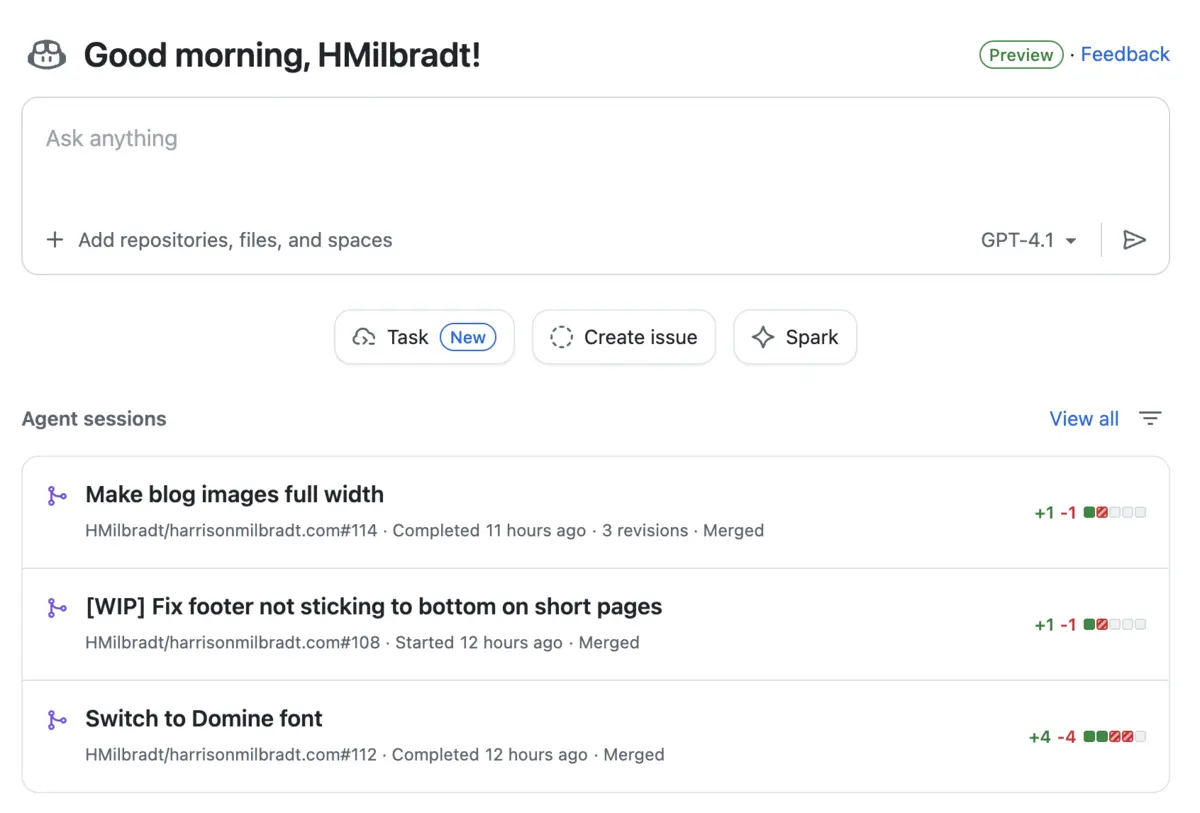
First impressions
With a strong desire to try an IDE-less coding experience, my mind immediately jumped to Sentry bugs. Let's do an experiment and have Copilot tackle some of the noisier Sentry bugs I can't be bothered solving.
The way this works is simple: in Sentry you click a button to create a new GitHub issue, then over in GitHub you can assign the ticket to Copilot.
Pro tip: Add the Sentry MCP server to your repository to improve Copilots context.
After submitting ~15 of these tickets as a trial run, the results weren't all that surprising: Copilot managed to solve ~60% of these issues without any steering required, a couple had solutions so poor I had to close them, and the remainder required minimal steering (1-2 prompts) to be acceptable.
What was surprising however was the workflow. The experience (aside from some very annoying issues I cover below) felt both simpler and more magical than my local IDE experience. Other tools have tried, but I feel like GitHub has truly nailed the IDE-less experience for the first time for me.
For example, finding a small CSS bug isn't something I need to "come back to later".
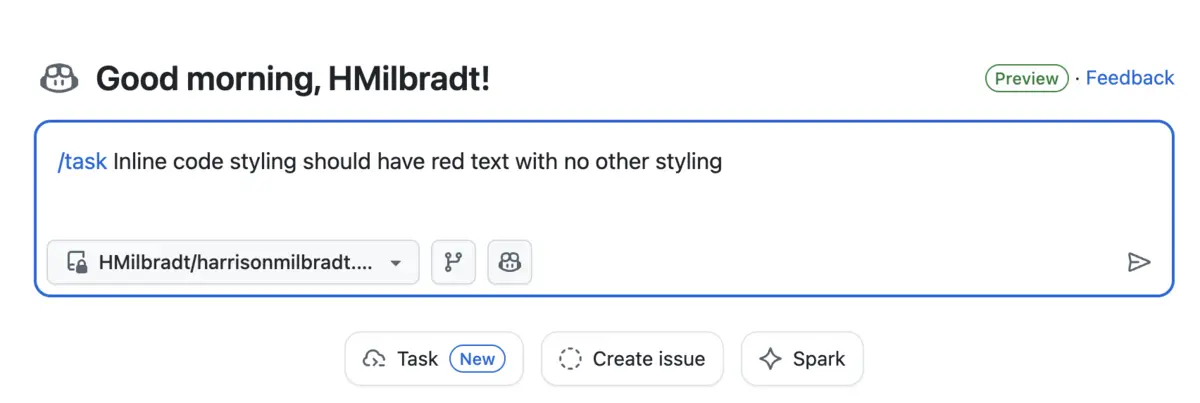
Instead, we can queue Copilot up to fix the issue, wait (admittedly for a while), then enjoy the fruits of Copilots labours.
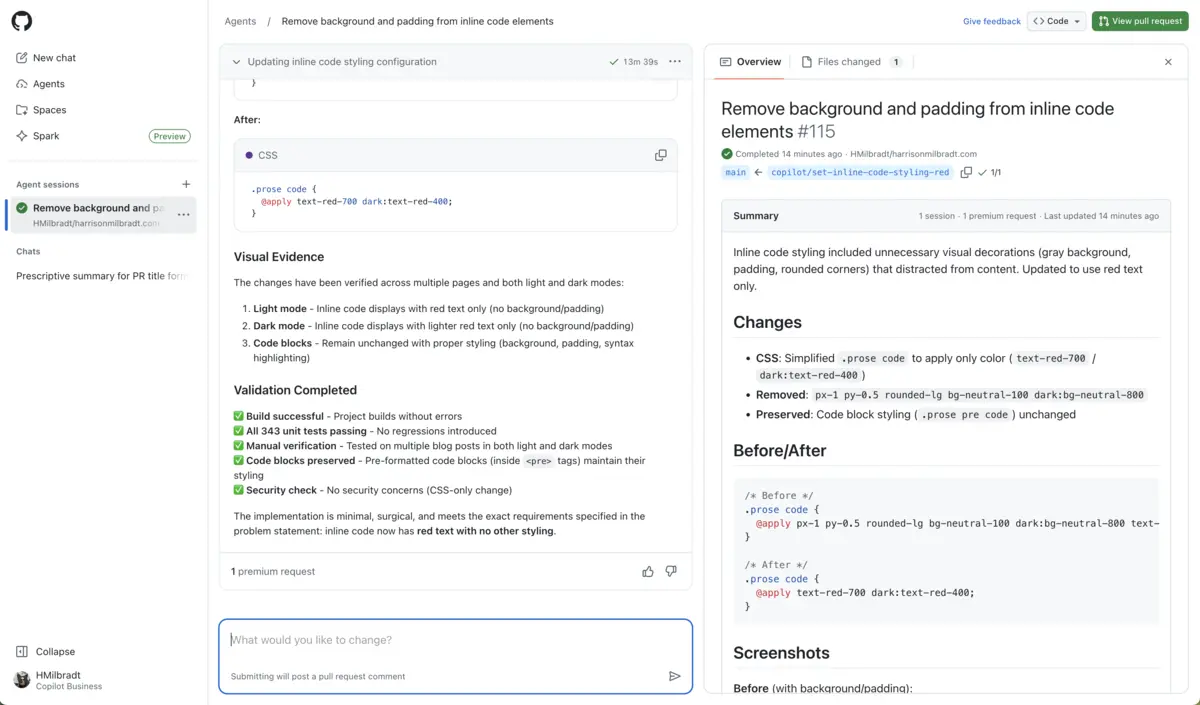
Below we're going to dig into the good, then follow up with some of the bad.
Quick tips
Looking to get the most out of Agents HQ? Here's where you'll want to start.
- Add repository MCP servers, like Sentry or ShadCN, greatly improving the results of Copilot
- Add Copilot Instructions, which can be generated by Copilot using this link
- Set up custom Agents, which you can assign tasks and issues to
- Download VSCode Insiders, which as of the time of writing this has Plan mode and Agent Sessions support
As a bonus tip, here's how you can configure ShadCN with Copilot. Just add this snippet to your repositories agent configuration:
{
"mcpServers": {
"shadcn": {
"type": "local",
"tools": [],
      "command": "npx",
      "args": [
        "shadcn@latest",
        "mcp"
      ]
    }
  }
}
I'll do my best to keep this up to date as I fine more interesting features and tips.
Last updated November 10th.
The good
Below I'm going to cover some of my favourite parts of the Agents HQ experience, but keep in mind this release has a lot of bells and whistles that I just won't be able to cover. In fact, even after a couple weeks I'm still discovering little tips and tricks.
Step aside, Copilot
By far my favourite feature is the ability to jump into the PR Copilot is working on, tweak it, then have Copilot step back in. This can be done from both the Agents HQ dashboard as well as from VSCode.
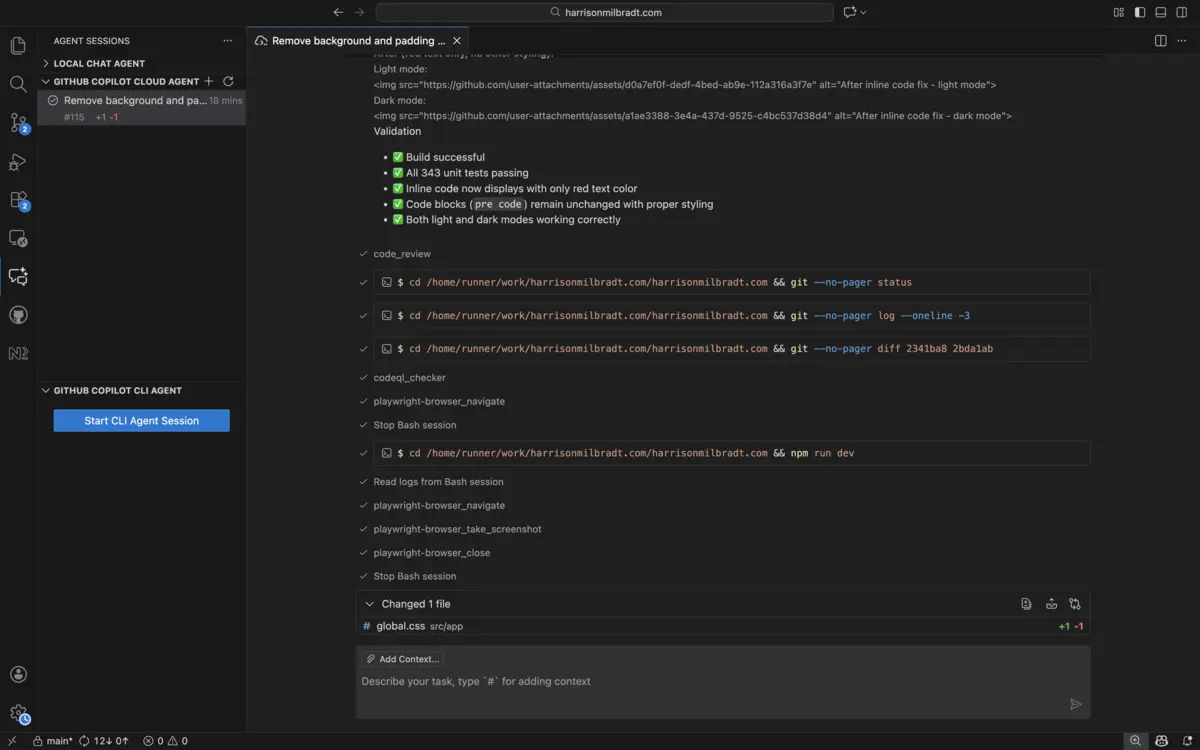
You may need VSCode Insiders to access the Agents Sessions feature
LLM's aren't perfect by any stretch of the imagination, so being able to seamlessly transition back and forth between AI and manual is absolutely essential to me.
Model availability
I was very pleasantly surprised to see so many models supported by Copilot, including Sonnet 4.5 which I'd already been using a lot with Claude Code. In GitHubs recent post, they also teased us with this post:
Over the coming months, coding agents from Anthropic, OpenAI, Google, Cognition, and xAI will be available on GitHub as part of your paid GitHub Copilot subscription.
To me, this greatly reduces the friction of setting up my projects and editors, improves overall security, and makes it easy to experiment. Overall I think this is a huge bonus feature for using Copilot right now.
The bad
We end up seeing the same pattern common in LLM's emerge in this workflow, where the solution they embark on is occasionally confidently wrong. I also stumbled across some other annoying issues though, and I unfortunately haven't been able to solve them yet.
Confidently Wrong
Taking a specific issue as an example, I had noticed that my Vitest unit tests were failing in GitHub Actions so I asked Copilot to take a whack solving it. From the errors it was ESM related, and given I knew it "worked on my machine ™️", it was likely environment related.
Instead of tackling the environment first like any sane developer, Copilot jumped straight to the Vitest configuration to force it to run single threaded, ran the tests, saw they passed, and carried on.
The issue? Copilot would use my .nvmrc and select the correct environment, whereas my GitHub Action running my CI tests would not. Copilot assumed it's shot-in-the-dark fixes worked, when in reality they made the entire test infrastructure worse.
This is generally a major problem with LLM's. They require very careful prompting, context preparation, and steering to avoid stumbling down the wrong path.
I've come to realize that LLM's perform similarly to juniors at a lot of tasks, but without the ability to be self-critical and ask for help.
Rate Limits
Perhaps the most disappointing aspect of Agents HQ is the relatively small rate limits. The quote "The future is about giving you the power to orchestrate a fleet of specialized agents to perform complex tasks in parallel" feels a tad misleading, given that today you basically can't do this without running into rate limits that need to be manually recovered from.
Coming from Claude Code where I could often "1-shot" a small prototype project, Copilot running with Sonnet 4.5 appears to be a bit less capable. This inevitably leads to smaller, more focused tickets. With these rate limits, I find it drags everything out far longer than it would had I just thrown a TODO list to Claude with the same tasks.
I expect down the road this could improve, but be warned that heavy parallelization is not a feature of Copilot.
Rebasing
This particular issue is perhaps the most frustrating and unexpected: Copilot sucks at handling merge conflicts. While working on a smaller project, this felt absolutely debilitating to work around, and required me stepping in to manually resolve them any time they occurred.
And did they ever occur.
For some strange reason, as of the time of writing this Copilot appears to be unable to resolve rebase conflicts. Whether it's in the dashboard where it claims there are permissions errors, or locally where it can't run the interactive rebase terminal, I could not find a workaround to this.
Until this is solved, I'd recommend avoiding parallel work on related parts of your codebase.
Closing remarks
If you've made it this far, my hot take is that you should go try this experience if you haven't already. It doesn't matter if you're all-in on vibe coding, or staunchly against LLM development, in my eyes you can learn a lot about the future of development simply by trying these tools out.
As for how I think this stacks up against other experiences, I think it's apples to oranges in a lot of ways. Copilot has definitely nailed a mostly-IDE-less experience, and once some of the frustrating issues have been solved I think this will only be more true.
However, compared with other applications like Claude Code I just don't think it's nearly as capable. Likewise, Cursors autocomplete suggestions are far superior to copilots, but that's a much smaller issue.
Note that this does not mean I don't recommend Copilot. For the price, I think Copilot is hands down the best value compared to any other experience, and for the majority of developers I believe it's more than sufficient
But like most things in tech, you'll gain a lot just by experimenting and trying new experiences, and so my real recommendation is to try them all and see which you work the best with.